Payment Voucher Workflow
Another option from the Workflow menu under Administration is the Payment Voucher Workflow link.
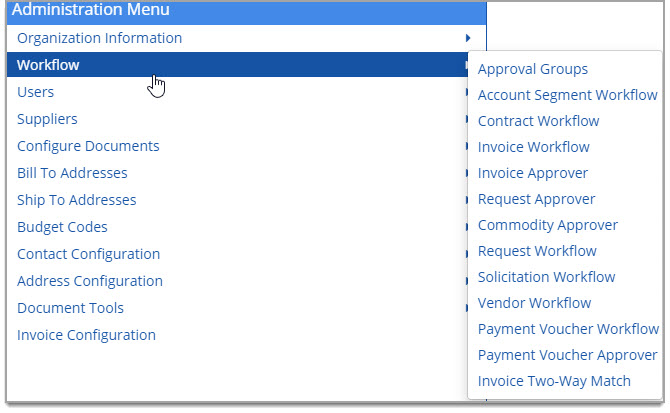
Select this option to establish rules for payment vouchers.
The Payment Voucher Workflow page opens:
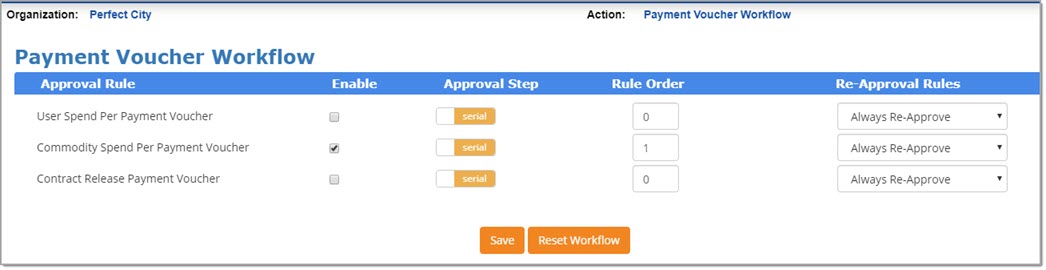
Each section of the page is discussed below.
Build Payment Voucher Workflow Rule
Enable Approval Rule
Click the Enabled check box to activate an Approval Rule.
Approval Step
By default the Approval Steps type is Serial. The alternate option is Parallel.
-
Serial - Approvals occur one after another. Each approval is completed in a designated order.
A Payment Voucher will not be available to Approver B until Approver A approves it. -
Parallel - Approval occurs independently of other approvals.
The document is sent to multiple approvers at the same time.
Rule Order
To change the order of how the Payment Voucher approval rules are launched, use the Rule Order column.
Enter a numeric value for the approval rule in the Rule Order box. The value entered determines in which order the rule will be processed. For example, Rule Order 1 is processed before Rule Order 2 and Rule Order 3, etc.
In the following image, the Commodity Spend Per Payment Voucher, if triggered, would be the first in the workflow path and then the Contract Release Payment Voucher match approval rule as the Rule Number is 2.
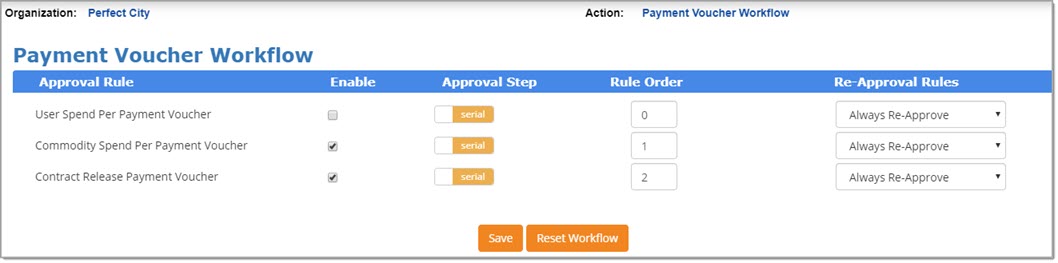
Using the same image above, if the Contract Release Payment Voucher rule needed to be the first rule that launches in the Payment Voucher workflow, you would switch the numbers in the Rule Order column and make Contract Release Payment Voucher number 1 and Commodity Spend Per Payment Voucher number 2.
Be sure to select Save at the bottom of the page to save your modified Rule Order.
Workflow
There are three payment voucher-related approval rules available.
Two are configured at the user-level:
-
User Spend Per Payment Voucher - If this rule is enabled, the Payment Voucher spend limits and approvers are configured in your user profile. The workflow will launch if your Payment Voucher total exceeds your designated limits.
-
Contract Release Payment Voucher - If this rule is enabled, the Contract Release Payment Voucher spend limits and approvers are configured in your user profile. The workflow will launch if your Payment Voucher total exceeds your designated limits.
See the Payment Voucher Workflow - User Level topic.
One is configured at the organization level:
-
Commodity Spend Per Payment Voucher - If this rule is enabled and the Payment Voucher is not associated with a contract, then workflow can be configured against a Commodity Code. If the Payment Voucher amount exceeds the designated trigger amount for the specified Commodity Code, then it will required one or more approvers.
Visit the Payment Voucher Approver topic for details.
Re-Approval Rules
Use the Re-Approval Rules drop-down menu selections to determine what happens if a Payment Voucher is modified.
-
Always Re-Approve - Any and all Payment Voucher edits will re-launch the enabled Approval Rule. This is the default setting.
-
No Re-Approval Required - None of the edits to a Payment Voucher will re-launch the enabled Approval Rule.
Be sure to Save.
Reset Workflow
Select Reset Workflow to clear the current workflow configuration.
The following confirmation message displays:
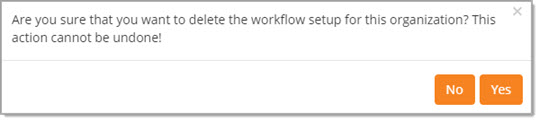
Click No to exit the message; existing workflow remains intact.
Click Yes to proceed with deleting all of the contract workflow setup for this organization.