Review / Award Informal Solicitation
To review and/or award an informal solicitation, select the Review / Award option from the Informal Solicitation section of the Solicitations drop-down menu, as shown below.
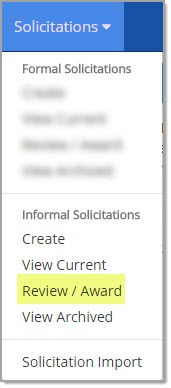
The Award Informal Solicitations page opens:
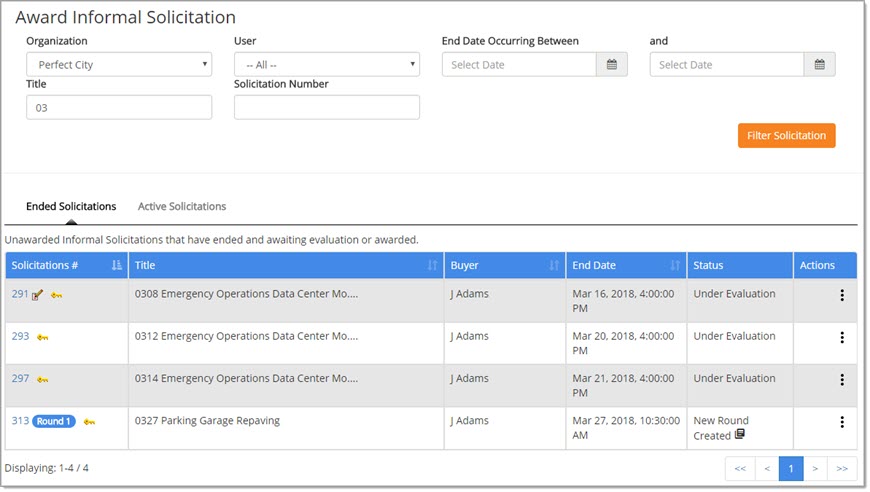
The Award Informal Solicitations page allows you to view informal solicitations that have ended and are awaiting evaluation or award.
By default, the page opens to the Ended Solicitations tab. The alternate view is Active Solicitations.
The top portion of the page provides multiple search options that may be applied to refine displayed results.
The Actions column contains a number of options that may be performed on the informal solicitation.
Search Informal Solicitations for Award
The top portion of the page includes the following filters that may be applied to refine displayed listing: (the same filters are available on both the Ended Solicitations and Active Solicitations tabs)
-
Organization - If you have privilege to view solicitations for more than one organization, the drop-down menu may be used to select an organization.
Only solicitations for the chosen organization will be returned. -
User - If you have privilege to view solicitations created by other users, the drop-down menu may be used to select a user.
Only solicitations created by the selected user will be returned. -
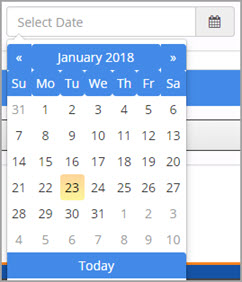
End Date Occurring Between: Use the end date range fields to list only those solicitations with duration end dates that are on a specified date or between two specified dates. Click the calendar
 icon to select the date.
-
Title: Enter a full or partial solicitation title to display only those solicitations that contain the entered alpha numeric characters.
An asterisk (*) may be used as a wildcard. -
Solicitation Number: Enter a full or partial solicitation number to display only those solicitations that contain the entered numeric characters.
An asterisk (*) may be used as a wildcard.
After selecting and/or entering filters, click Filter Solicitations to return only those solicitations that match the criteria.
Search Results
The Solicitation # is the default primary sort in ascending order as indicated by this icon:  .
.
Click this icon to switch to descending order.
Columns with the vertical
arrows may be selected as an alternate sort.
-
Solicitation # - This is the system-generated or user-entered number assigned to the solicitation during creation. The Solicitation # is hyper linked and will open the solicitation for viewing. There are a several possible icons or labels that may be displayed next to the Solicitation #. They include the following:
-
-
Co-op
 - Displayed next to solicitations that are Demand Aggregation enabled.
 -
Private
 - Solicitations marked with a key symbol have an Invitation Type of Private. New solicitation rounds created from a solicitation are
automatically listed as Private and cannot be made Public.
- Solicitations marked with a key symbol have an Invitation Type of Private. New solicitation rounds created from a solicitation are
automatically listed as Private and cannot be made Public. -
Round Number
 - If your organization utilizes post
event multi-round solicitations, a badge identifying the Round Number will be displayed to the right of the Solicitation #. Learn more about Multi-Round Solicitations.
- If your organization utilizes post
event multi-round solicitations, a badge identifying the Round Number will be displayed to the right of the Solicitation #. Learn more about Multi-Round Solicitations.
NOTE: For solicitations created outside of a user's buying organization, round information will not be visible.
-
-
Title - The solicitation name as entered by the solicitation creator.
-
-
Participation Period Open -
 The tree symbol displays next to all solicitations that are Demand Aggregation enabled where the participation period is currently active.
-
-
Buyer - Displays the user that created the solicitation or solicitation round.
-
End Date -
-
-
For the Ended Solicitation tab, this is the date and time the solicitation ended and was closed to suppliers for review and/or response.
-
For the Active Solicitations tab, this is the date and time the solicitation will end and when suppliers will no longer be able to review and/or respond.
-
-
Status - The status of the solicitation will vary based on the tab you are viewing:
-
-
Ended Solicitations tab:
-
-
Approved - Solicitation has been approved through the Pre-Award workflow process or workflow process was not required. The solicitation award is ready to be Finalized.
-
New Round Created
 - A new solicitation round has been created from the original solicitation or the previous round of a solicitation.
 -
Under Evaluation - Supplier responses are being reviewed and evaluated to determine whether or not the solicitation may be awarded or not.
-
-
Active Solicitations tab:
-
-
Active - Solicitation is currently Active. It is within the Starting and Ending Dates and Times . Suppliers are able to view and/or respond to the solicitation.
-
Under Evaluation - Supplier responses are being reviewed and evaluated to determine whether or not the solicitation may be awarded or not.
-
-
-
Actions - See the Actions topic.